

How insurance renewal automation works: a guide for brokers
A practical guide to insurance renewal automation: renewal queues, reminder schedules, owners, payment links and the numbers that show it is working.
Every policy you place comes back for renewal, and every renewal is a moment when the customer can stay, move to a competitor or let the cover lapse. Insurance renewal automation turns those moments into a managed process: each policy end date becomes a task with an owner, a reminder schedule and a recorded outcome, so nothing depends on someone remembering to check a spreadsheet.
This guide explains how renewal automation works in practice for insurance brokers, insurance marketing firms (IMFs), corporate agents and POSP networks in India — the workflow, a sample reminder schedule, the product details that matter, the numbers worth tracking and a simple way to get started.
What renewal automation actually does
At its core, renewal automation is a queue. The system reads the expiry or premium due date of every live policy and, at fixed points before that date, creates the next action: prepare a renewal quote, remind the customer, send a payment link, call, escalate. Each action is assigned to a person — a relationship manager, a telecaller or the POSP who sourced the policy — and the queue shows what is due today, what is overdue and what has already been renewed.
Automation does not replace people. It removes the manual work of finding due policies, writing the same reminder fifty times and chasing status updates, so the team spends its time on the conversations that actually keep customers.
Why renewals slip through manual processes
Most lost renewals are not lost on price. They are lost because nobody followed up in time. The usual causes are familiar:
Due dates live in spreadsheets or insurer portals, so someone has to remember to look.
There is no clear owner — the advisor who sold the policy has moved on, or a POSP-sourced policy is invisible to the head office.
Reminders start too late, leaving no time to compare options or arrange payment.
Renewal quotes are prepared at the last minute, often after the customer has already received an offer elsewhere.
Outcomes are not recorded, so the business never learns why customers leave.
How an automated renewal workflow works, step by step
1. Start with clean policy data
Automation is only as good as the data behind it. Each policy record needs the policy number, insurer, product, customer contact details, premium, start and end dates, premium payment frequency and the person responsible. Import the existing book once from insurer statements or Excel, clean up duplicates and missing dates, and let new policies flow in from your policy administration system.
2. Build the renewal queue
Renewal tasks are created automatically from the end dates — typically 60 days ahead for motor and health policies, and from the premium due date for life policies paid in instalments. All of them appear in one queue that can be filtered by product, branch, insurer, owner or channel.
3. Assign an owner and an escalation path
Every renewal gets exactly one owner. If nothing happens by a set point — for example, ten days before expiry — the task escalates to a team lead. For POSP-sourced business, each POSP sees the renewals of their own customers, while the distribution head sees the whole network in POSP and partner management.
4. Remind customers on the channels they use
Reminders go out on WhatsApp, SMS and email using approved templates, at the stages you define. Each message carries the policy details and one clear next step. Customers who have opted out of a channel are not contacted on it, and every message is logged against the policy.
5. Prepare the renewal offer
For brokers, renewal is also a chance to review the cover. The renewal task can open a quotation with the current insurer's terms and alternatives side by side, so the advisor calls the customer with options rather than a bare premium figure.
6. Collect payment and confirm
A payment link or the insurer's payment journey is shared with the customer. Once payment is confirmed, the new policy number and dates are recorded and the renewal is closed — which also creates next year's renewal automatically.
7. Close the loop
Every renewal ends with an outcome: renewed with the same insurer, moved to another insurer through you, lost (with a reason) or no longer due. These outcomes feed the reports and make renewal commission easy to reconcile in commission management.
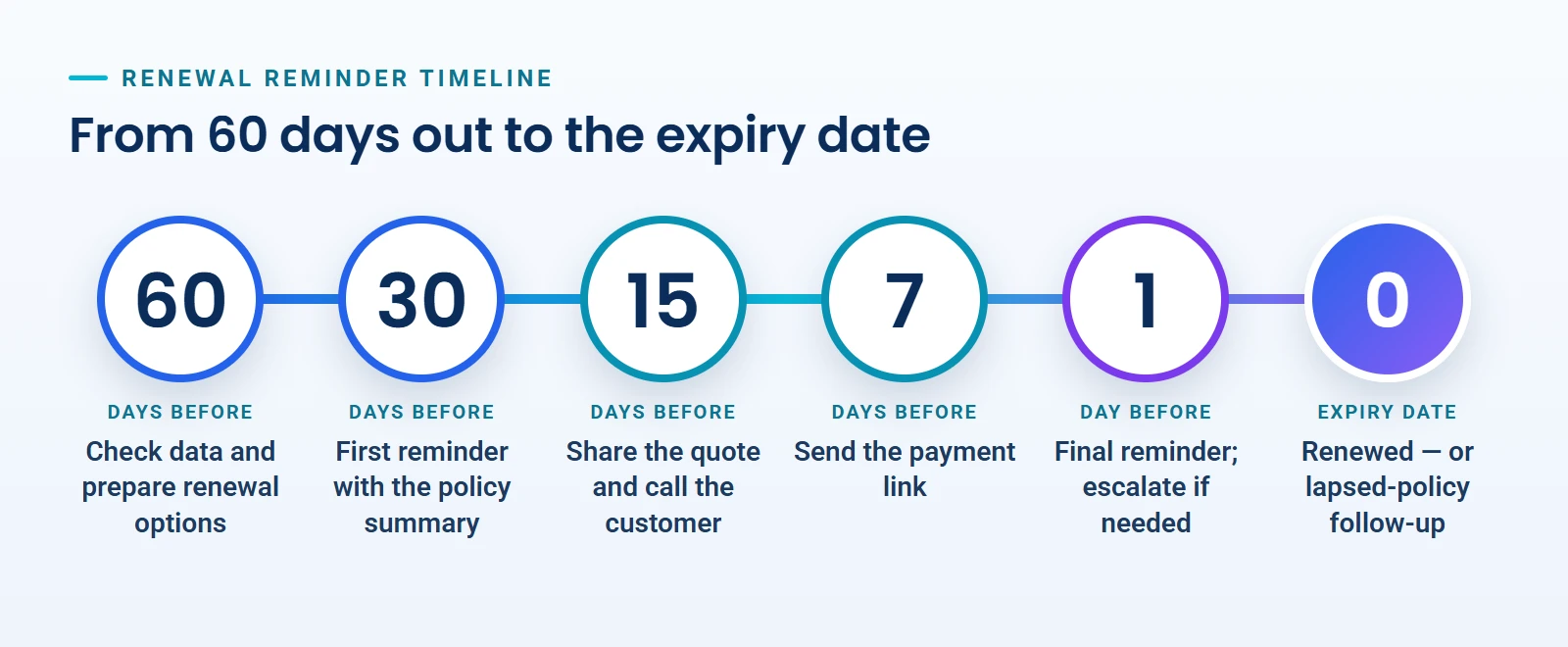
A sample renewal reminder schedule
The right schedule depends on the product and on your customers, but most teams start with something close to this and adjust it after a few months of data.
When | Action | Channel | Owner |
|---|---|---|---|
60 days before expiry | Check the policy data and claims history, prepare renewal options | Internal task | Operations or RM |
30 days before | First reminder with a policy summary | WhatsApp and email | Automatic |
15 days before | Share the renewal quote and call the customer | Call, WhatsApp | RM or POSP |
7 days before | Send the payment link and answer questions | WhatsApp, SMS | RM or POSP |
1 day before | Final reminder; escalate if the policy is not renewed | Call, SMS | Team lead |
After expiry | Follow up on lapsed policies and record the reason | Call | Retention team |
Tip: start earlier for high-value or complex policies such as group health, fleet motor and commercial cover. They need more time for underwriting questions, quotes from several insurers and internal approvals.
Product details that matter
Motor insurance
Renewing before expiry avoids a gap in cover, and a lapsed policy may need a vehicle inspection before it can be renewed. Delays can also cost the customer their no-claim bonus, which is lost if the policy is not renewed within 90 days of expiry. A reminder that mentions the no-claim bonus the customer has earned is one of the most effective messages you can send.
Health insurance
For health policies, continuity is the key message. Waiting periods for pre-existing conditions and specific illnesses are served across continuous renewals, and a lapse can mean losing that credit. Renewal is also a good moment to review the sum insured as family needs and medical costs change.
Life insurance
Life policies with regular premiums have a grace period after each due date — commonly 30 days, or 15 days for monthly premiums — after which the policy can lapse. Here the workflow follows premium due dates rather than an annual expiry, and it measures persistency: the share of policies still in force at the 13th, 25th, 37th, 49th and 61st month.
Always follow the policy wording and each insurer's rules; the automation should reflect them, not replace them.
The numbers to track
Renewal rate — policies renewed as a share of policies due, by month, product, insurer and owner.
Persistency for life business at the 13th and 61st month, compared across channels and POSPs.
Days to renew — how close to the expiry date customers renew; earlier renewals mean a healthier process.
Lost reasons — price, service, cover no longer needed, renewed elsewhere, unreachable.
Channel response — which reminders and channels lead to renewals.
Renewal commission received against expected, insurer by insurer.
These figures belong on a shared dashboard in your business intelligence and MIS reports, reviewed weekly by the team and monthly by management.
What to look for in renewal software
Import from insurer statements and Excel, with checks for duplicates and missing dates.
Reminder schedules you can set per product and customer segment.
WhatsApp, SMS and email templates, with consent records and delivery logs.
Owner assignment, escalation and a separate view for each POSP.
Renewal quotes and payment links started from the renewal task.
Outcome tracking with lost reasons and a full audit trail.
Role-based access, so each person sees only the customers they serve.
Connections to your CRM, policy records and commission reconciliation.
Getting started in 30 days
Week 1: clean the data for one product line and agree who owns which renewals.
Week 2: set the reminder schedule and write the message templates.
Week 3: run a pilot with one team or branch and record every outcome.
Week 4: review the renewal rate and the lost reasons, adjust the schedule, then extend it to the next product.
Frequently asked questions
Does automation mean customers only receive automated messages?
No. Reminders are automated, but the important steps — explaining options, handling objections and confirming cover — stay with an advisor. Automation makes sure that conversation happens on time.
Can POSPs use the same renewal workflow?
Yes. Each POSP can see and work their own renewals, while the head office sees the whole network and steps in when a renewal is overdue.
How soon do results show?
Most teams miss fewer renewals within the first renewal cycle, because every due policy now has an owner and a reminder schedule. Better persistency figures follow over the months after that.
Next step
Buy Solution AI's Renewal & Persistency Management module creates renewal queues, reminder schedules, follow-up ownership and persistency views for brokers, IMFs, corporate agents and POSP networks, alongside the insurance CRM, policy records and commission modules. Request a demo to see it with your own renewal workflow.